
Most Gen Mobile customers finish activation by calling Gen Mobile Customer Care at (833) 528-1380 or using live chat. A Gen Mobile phone usually arrives ready to use. A Gen Mobile SIM card or eSIM needs a short activation with a Customer Care agent. If you want to keep your old phone number, have your old account details ready before you call.
This guide covers each activation path step by step: a phone from Gen Mobile, a SIM card in your own phone, and an eSIM. It also explains how to transfer your number and what to do when activation doesn’t work.
Quick Answer: Gen Mobile Activation
- Gen Mobile Customer Care: (833) 528-1380, phone or chat, 7:00 a.m.–5:30 p.m. Pacific, 7 days a week.
- Phone from Gen Mobile: Gen Mobile says its phones arrive activated. Follow the instruction sheet in the box.
- SIM card: Put the SIM in your phone, then call or chat with Customer Care to finish activation.
- eSIM: You need the account PIN Gen Mobile mails separately. Your phone must be on Wi-Fi during setup.
- Keeping your number: Don’t cancel your old service first. The transfer can take up to 48 business hours.
What Do You Need to Activate Gen Mobile?
To activate Gen Mobile, you need your Gen Mobile SIM, eSIM, or phone, plus a working phone that Gen Mobile supports. If you’re keeping your old number, you also need the account details from your old carrier. Gather everything first so you only have to call once.
| What you’re activating | What to have ready |
|---|---|
| Phone shipped by Gen Mobile | The phone, the instruction sheet in the box, and your welcome text from Gen Mobile |
| SIM card in your own phone | Gen Mobile SIM card, your phone’s IMEI number, and an unlocked phone that works with Gen Mobile |
| eSIM | The account PIN Gen Mobile mails separately, a Wi-Fi connection, and an eSIM-capable phone |
| Keeping your old number | Old account holder’s first and last name, the 10-digit number, the old account number, the transfer (porting) PIN, and full address with 5-digit ZIP |
How to find your IMEI number: Dial *#06# on your phone. Your IMEI shows on the screen. You can also find it in Settings → About phone (Android) or Settings → General → About (iPhone).
How to Activate a Gen Mobile Phone
Gen Mobile says phones bought from Gen Mobile arrive activated and ready to use. If you were approved for Lifeline and Gen Mobile sent you a phone, follow the activation sheet that came in the box. Gen Mobile includes activation instructions in every order.
- Charge the phone fully before you start.
- Turn on the phone and follow the setup screens (language, Wi-Fi, Google or Apple account).
- Make a test call and send a test text to confirm service works.
- Open a web page with Wi-Fi turned off to check that mobile data works.
- Save your welcome text. It includes a 4-digit PIN for the MyGenMobile app, where you can check your plan and data.
If the phone shows “No Service” or “SIM not provisioned,” call Customer Care at (833) 528-1380. The phone may need to be turned on in Gen Mobile’s system.
How to Activate a Gen Mobile SIM Card in Your Own Phone
To activate a Gen Mobile SIM card, put the SIM in your unlocked phone, then call or chat with Gen Mobile Customer Care. Gen Mobile’s online activation page at activate.genmobile.com asks for your SIM number, but it says a Customer Care agent must finish the SIM activation. Plan on talking to an agent either way.
Step 1: Check that your phone works with Gen Mobile
Gen Mobile says a phone you bring must be:
- Unlocked and fully paid off (no contract with another carrier)
- 4G LTE or 5G capable and VoLTE (Voice over LTE) compatible
- Not reported lost or stolen
You can check your phone with Gen Mobile’s compatibility checker at imei.genmobile.com. For more on using your own device, see our guide to bringing your own phone to Lifeline.
Step 2: Pick the right SIM size
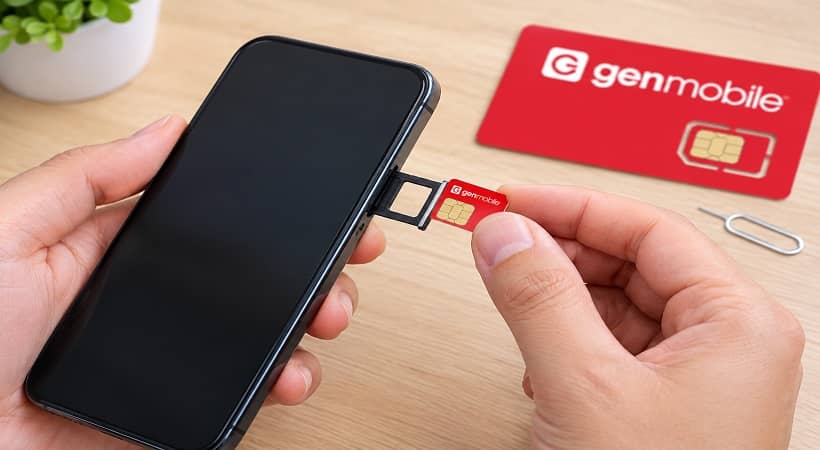
Gen Mobile SIM kits come in standard, micro, and nano sizes on one card. Open your phone’s SIM tray first to see which size fits. Then pop out only that size.
Step 3: Insert the SIM
- Turn off your phone.
- Open the SIM tray with the small pin (or a straightened paper clip).
- Place the Gen Mobile SIM in the tray, gold contacts facing down.
- Slide the tray back in and turn the phone on.
- Step 4: Call or chat with Customer Care to activate
- Call (833) 528-1380 from another phone, or start a chat on Gen Mobile’s Contact Us page.
- Give the agent your SIM number (the long number printed on the SIM card, also called the ICCID) and your phone’s IMEI.
- Say whether you want a new number or want to keep your old one.
- Restart your phone once the agent confirms activation.
- Step 5: Test your service
Make a call, send a text, and load a web page with Wi-Fi off. If all three work, you’re done.
How to Activate a Gen Mobile eSIM
An eSIM is a digital SIM built into newer phones. There’s no card to insert. Gen Mobile says you need your account PIN, which is mailed separately, to activate an eSIM. Your phone must also be connected to Wi-Fi (or have service from another active SIM) during setup, because the eSIM downloads over the internet.
- Wait for your account PIN to arrive in the mail.
- Connect your phone to Wi-Fi.
- Follow the eSIM instructions Gen Mobile sent you, or call (833) 528-1380 so an agent can walk you through it.
- Scan or install the eSIM profile when your phone asks. On most phones this is under Settings → Cellular/Mobile Network → Add eSIM.
- Restart the phone and test calls, texts, and data.
Tip: Don’t delete an eSIM profile unless an agent tells you to. A deleted eSIM usually can’t be reinstalled without contacting Customer Care.
How to Keep Your Phone Number When You Activate Gen Mobile
You can transfer your current phone number to Gen Mobile. This is called “porting.” Gen Mobile says your old carrier can take up to 48 business hours to release the number. The most important rule: do not cancel your old service first. Your old account must stay active, or the transfer will fail.
- Get your account number and transfer PIN from your old carrier. Most carriers let you request a transfer PIN in their app, on their website, or by calling.
- Send your transfer details to Gen Mobile. You can call (833) 528-1380, use chat, or email care@genmobile.com.
- Wait for the transfer to finish. Your old phone will usually lose service when the number moves over.
- Don’t submit a second transfer request while the first is in progress.
If you’re switching your Lifeline benefit from another provider, read our guide on keeping your number when switching Lifeline providers.
Gen Mobile Activation Not Working? Try These Fixes
Most Gen Mobile activation problems come from a locked phone, the wrong SIM size, an unfinished number transfer, or data settings that need updating. Work through these fixes in order before calling Customer Care.
No service or “Invalid SIM”
- Restart the phone.
- Remove the SIM, wait 30 seconds, and put it back in.
- Check that the SIM sits flat in the tray.
- Confirm your phone is unlocked. A phone locked to another carrier will reject the Gen Mobile SIM.
- Ask Customer Care to confirm the SIM was fully activated on their end.
Calls and texts work, but data doesn’t
Gen Mobile suggests updating your APN (Access Point Name) settings. APN settings tell your phone how to connect to mobile data.
- Go to apn.genmobile.com and choose the option to check APN settings by phone number.
- Enter the settings shown into your phone’s APN screen. Gen Mobile says to leave any other fields blank.
- Turn off Airplane mode and data roaming. Turn on mobile/cellular data.
- Turn off Wi-Fi so you’re testing mobile data only.
- Restart the phone.
Also check that your plan has data left. You can see this in the MyGenMobile app.
Number transfer is stuck
- Wait the full 48 business hours before worrying.
- Double-check that the account number and transfer PIN match your old carrier’s records exactly.
- Make sure your old service is still active.
Still stuck?
Call Gen Mobile at (833) 528-1380 or use chat, 7:00 a.m. to 5:30 p.m. Pacific, any day of the week. For problems with other carriers, see our government phone activation hub.
After Activation: Keep Your Gen Mobile Lifeline Benefit Active
If your Gen Mobile service comes through the Lifeline program, there are two rules that keep your free service going:
- Use your service at least once every 30 days. A call, text, or data use counts. If you don’t use it for 30 days, you’ll get a notice and have 15 days to use it before you can lose the benefit.
- Recertify every year. USAC (the Universal Service Administrative Company, which runs Lifeline for the FCC) or your state will ask you to confirm you still qualify. Our Lifeline recertification guide explains how.
You can check your Lifeline status with Gen Mobile on its My Benefit Status page at lifeline.genmobile.com. For full program rules, see the FCC’s Lifeline consumer page.
Scam reminder: Lifeline is free to apply for. Gen Mobile and other real Lifeline providers don’t charge an application fee. If someone asks you to pay to “activate” a free government phone, stop and read our Lifeline scam alert.
Frequently Asked Questions
The Gen Mobile Customer Care number is (833) 528-1380. Phone and chat support are open 7:00 a.m. to 5:30 p.m. Pacific time, seven days a week, according to Gen Mobile’s activation page.
Partly. Gen Mobile’s activation site (activate.genmobile.com) collects your SIM number, but Gen Mobile says a Customer Care agent must complete SIM activation. Most people finish by phone or chat.
A new SIM or eSIM is usually working within a single call to Customer Care. If you’re transferring your number, your old carrier can take up to 48 business hours to release it.
Gen Mobile works with phones that are unlocked, paid off, 4G LTE or 5G capable, VoLTE compatible, and not reported lost or stolen. Check yours at imei.genmobile.com before activating.
Yes. When its parent company’s Dish Wireless and Dish DBS units filed for Chapter 11 in June 2026, industry reports said Gen Mobile was not part of the filing and was operating normally. If you’re unsure about any provider, use our guide to verifying a Lifeline provider.