
You can activate your Life Wireless phone or SIM card online at the official Life Wireless activation page, or by calling Life Wireless. You’ll need your approval details and some basic ID info: your last name, date of birth, the last four digits of your Social Security number, and your ZIP code. Most people finish in a few minutes.
This guide covers what to have ready, the online and phone steps, and how to use a Life Wireless SIM in your own phone. It also covers keeping your old number and fixing common activation problems.
Quick Answer
- Where to activate: lifewireless.com → My Account → Activate (the official page), or call Life Wireless.
- What you need: an approved Life Wireless application, your SIM card or phone, and your last name, date of birth, last 4 of your SSN, and ZIP code.
- Customer care: dial 611 from your Life Wireless phone (free), or call (888) 543-3620, Monday–Friday, 9 a.m.–6 p.m. ET.
- Network: Life Wireless runs on AT&T’s network, so a bring-your-own phone must work on AT&T.
- Activation is free. Lifeline itself is free to apply for, and no legitimate provider charges an application fee.
What Do You Need to Activate Life Wireless?
To activate Life Wireless, you need an approved Lifeline application with Life Wireless, plus a compatible phone. That phone is either your own unlocked phone with a Life Wireless SIM card, or a Life Wireless phone. You’ll also need a few personal details to confirm your identity.
Gather these before you start:
- Your Life Wireless SIM card (or Life Wireless phone) from your welcome package
- Your last name exactly as it appears on your application
- Your date of birth
- The last 4 digits of your Social Security number
- Your ZIP code (the one on your application)
- A charged phone and, for online activation, Wi-Fi or another device with internet
- Your old carrier’s account number and PIN, if you want to keep your current number
Not approved yet? Activation won’t work until your application is approved. See our guide on how to apply for Lifeline, or check whether you meet the Lifeline eligibility rules.
Does Life Wireless Still Send a Free Phone in 2026?
For most new customers, no. In August 2025, Life Wireless notified state regulators (including Pennsylvania, Kentucky, and Utah) that it would stop giving free handsets to new subscribers. Its Lifeline plans now promote “bring your own phone,” so most new customers receive a SIM card to use in a phone they already own.
That’s why this guide covers both situations:
- You got a SIM card: follow the online steps, then the “your own phone” section below.
- You have a Life Wireless phone (from before the change, or a replacement): the SIM is usually already inside, so just follow the online or phone steps.
To learn more about Life Wireless as a provider, read our Life Wireless review.
How to Activate Life Wireless Online (Step by Step)
Online activation is the fastest way to activate Life Wireless. You confirm your identity on the official Life Wireless activation page, enter the details it asks for, and submit. Do this on Wi-Fi or another device, because your new SIM won’t have service until activation is done.
- Open the official activation page at lifewireless.com. From the homepage, tap My Account → Activate.
- Enter your last name, date of birth, the last 4 digits of your SSN, and your ZIP code, exactly as they appear on your application.
- Follow the on-screen prompts. If asked, enter the SIM card number printed on your SIM card or its holder.
- Submit the form and wait for the confirmation screen. Take a screenshot of it.
- Restart your phone after activation so it connects to the network.
- Test your service by making a short call and sending a text.
How to Activate Life Wireless by Phone
If the website isn’t working, or you’d rather talk to someone, you can activate Life Wireless by phone. You can call the activation line from your new Life Wireless phone, or reach customer care for help with activation.
- Insert your Life Wireless SIM card (if it isn’t already in the phone) and turn the phone on.
- Call the Life Wireless activation line at 770-200-1000 from the Life Wireless phone. Life Wireless says this call is free and takes about a minute.
- Follow the voice prompts to finish.
- If that line doesn’t work, dial 611 from your Life Wireless phone, or call (888) 543-3620 from any phone. Customer care helps with first-time activation.
California residents: California LifeLine customers activate by calling Life Wireless’s automated phone system. Life Wireless’s California terms list a one-time activation charge that is waived for approved California LifeLine participants. See our California Lifeline guide for state-specific rules.
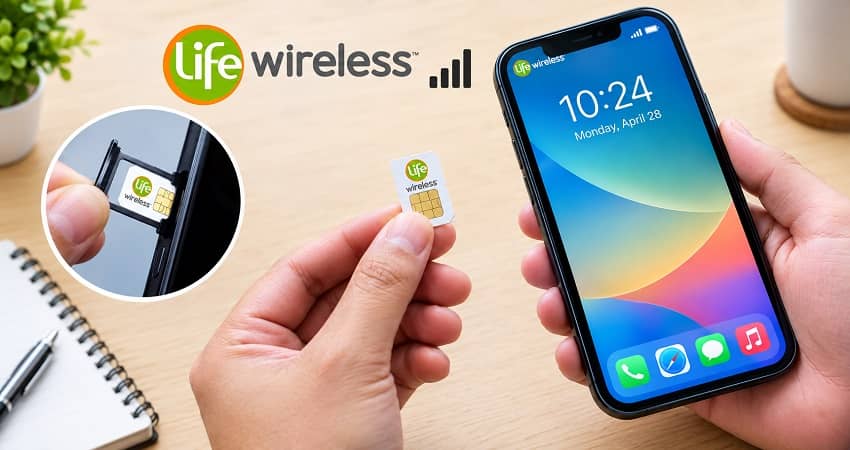
How to Use a Life Wireless SIM Card in Your Own Phone
To use a Life Wireless SIM card in your own phone, the phone must be unlocked and must work on AT&T’s network. Life Wireless’s coverage map points to AT&T, so the phone needs AT&T 4G LTE or 5G support with HD Voice (VoLTE). Older 3G-only phones won’t work.
Check your phone first:
- Unlocked: A phone still locked to another carrier will show “SIM not supported.” Ask your old carrier to unlock it.
- Compatible: Most recent iPhones and Android phones bought unlocked will work. Check with Life Wireless before you start if you’re unsure.
- Not a tablet or hotspot: Life Wireless’s terms don’t allow data-only devices on its service.
Then swap the SIM:
- Power off your phone.
- Open the SIM tray with a SIM tool or a straightened paper clip.
- Place the Life Wireless SIM in the tray (gold contacts facing down), and slide the tray back in.
- Turn on the phone and complete the online or phone activation steps above.
- Restart the phone once more if you don’t see signal bars within a few minutes.
For a deeper look at bringing your own device, see our Lifeline BYOP guide.
How to Keep Your Old Phone Number with Life Wireless
You can usually keep your current phone number when you activate Life Wireless. Life Wireless says to call customer care at (888) 543-3620 after your welcome package arrives. Don’t call from your Lifeline phone. Have your old carrier’s account number and PIN ready.
- Get your account number and transfer PIN from your old carrier. Don’t cancel the old service yet.
- Call Life Wireless at (888) 543-3620 from a different phone.
- Give the representative your old number, account number, and PIN.
- Wait for the transfer to finish. Your old phone loses service when the move is complete.
Our guide to keeping your number when switching Lifeline providers explains the process in more detail.
How Do You Know Your Life Wireless Activation Worked?
Your Life Wireless activation worked if you see signal bars and your carrier name, and you can make a regular call and send a text. If only emergency calls work, or the phone says “SOS only,” the line isn’t active yet.
Run this quick check:
- Call a friend or family member. Don’t use 911 as a test.
- Text someone and ask them to reply.
- Turn on mobile data and open a website while off Wi-Fi.
- Dial 611 if anything fails. The call to Life Wireless customer care is free.
Life Wireless Activation Not Working? Common Problems and Fixes
Most Life Wireless activation problems fall into a few groups: details that don’t match your application, a locked or incompatible phone, a SIM that isn’t seated correctly, or a line that isn’t active yet. The table below matches each problem to its most likely fix.
| Problem | Likely cause | What to try |
|---|---|---|
| Activation form won’t accept your info | Details don’t match your application | Re-enter your name, birth date, and ZIP exactly as on your application. Then call (888) 543-3620. |
| “SIM not supported” or “Invalid SIM” | Phone is locked to another carrier | Ask your old carrier to unlock the phone, then try again. |
| No bars or “SOS only” | Line not active yet, or SIM not seated | Restart the phone, turn Airplane Mode on and off, and re-insert the SIM. |
| Calls and texts work, but data doesn’t | Data is off or network settings are missing | Turn on mobile data, restart, and dial 611 to get the right network settings. |
| Only 911 works | Application not approved or activation not finished | Check that you were approved, then call Life Wireless. |
| Old number didn’t transfer | Wrong account number or PIN | Get the correct details from your old carrier and call from another phone. |
| SIM card is damaged or defective | Faulty SIM | Life Wireless replaces defective SIMs free within 30 days of activation. After that, the fee is $5. |
If your phone shows no service in your area, check the official Life Wireless coverage map. For general activation help across carriers, visit our government phone activation hub.
After Activation: How to Keep Your Life Wireless Service Active
To keep Life Wireless service, use your phone at least once every 30 days and recertify for Lifeline every year. Federal rules require both. If you skip either one, you can be removed from Lifeline and may lose your phone number.
- Use it every 30 days. A call, a text, using data, or answering a call (from anyone except Life Wireless) all count. After 30 days without use, Life Wireless sends a notice and gives you 15 days to use the service.
- Recertify every year. You’ll get a reminder. Our Lifeline recertification guide walks you through it.
- One benefit per household. Only one Lifeline benefit is allowed per household, not per person. Learn more about the one-per-household rule.
Stay Safe: Only Activate on the Official Life Wireless Website
Many unofficial websites copy the “lifewireless.com activate” name and look like the real page. Only enter your personal details on lifewireless.com, or give them to a Life Wireless representative you called yourself. Life Wireless doesn’t charge to activate federal Lifeline service.
- Check the web address. It should read lifewireless.com. Ignore Google Sites pages, form pages, or other look-alike domains.
- Never pay an “activation fee” for federal Lifeline service to a third-party site.
- Not sure a company is real? Here’s how to verify a Lifeline provider, plus our Lifeline scam alert with common warning signs.
Frequently Asked Questions
Life Wireless activation usually takes just a few minutes, online or by phone. Life Wireless says a call to its activation line takes less than a minute. If you’re keeping your old number, the transfer can take longer. Restart your phone after activation so it connects to the network.
Activating federal Lifeline service with Life Wireless is free, and no legitimate Lifeline provider charges an application fee. California is different: Life Wireless lists a one-time activation charge there, which is waived for approved California LifeLine participants. Be wary of outside websites that ask you to pay to activate.
Life Wireless lists 770-200-1000 as its activation line. For help, dial 611 from your Life Wireless phone, or call customer care at (888) 543-3620. Life Wireless lists hours of Monday–Friday, 9 a.m. to 6 p.m. Eastern.
Yes, if the iPhone is unlocked and supports AT&T’s 4G LTE or 5G network with HD Voice (VoLTE). Life Wireless welcomes customers who bring their own phone. If your iPhone says “SIM not supported,” it’s likely locked to another carrier. Unlock it first, then activate.
Your Life Wireless phone only calls 911 when the line isn’t fully active. Usually the application isn’t approved yet, activation wasn’t completed, or service was paused after 30 days without use. Phones can always reach 911. Call (888) 543-3620 to check your account status.
Yes. Life Wireless says if you’ve had Lifeline for more than 60 days, you can apply and you’ll be switched automatically once approved. If it’s been less than 60 days, de-enroll from your current carrier first. See our guide on how to switch Lifeline providers.