
Most unlocked 4G LTE and 5G smartphones work with AirTalk Wireless. That includes many iPhone, Samsung Galaxy, and Motorola models. Your phone needs to meet a few conditions:
- It must be unlocked.
- It must support the GSM network bands AirTalk uses.
- It must support Voice over LTE (VoLTE).
- It must pass AirTalk’s free IMEI check.
If your phone checks out, you can keep it and get a free SIM card or eSIM instead of a new device.
This guide covers which phones usually work, how to check yours in about five minutes, and how AirTalk’s BYOP sign-up works. It also explains what to do if your phone doesn’t pass.
Quick Answer
- AirTalk’s Bring Your Own Phone (BYOP) program lets eligible Lifeline customers use their current phone with a free SIM kit or eSIM.
- Your phone must be unlocked. It must also support GSM, 4G LTE, and VoLTE. Phones that only run on 3G will not work.
- To test your phone, enter its 15-digit IMEI number on AirTalk’s BYOD page. Dial *#06# to find the IMEI.
- For an eSIM, AirTalk also needs your phone’s EID number.
- Lifeline rules stay the same when you bring your own phone. You get one benefit per household, worth up to $9.25/month, or up to $34.25/month on qualifying Tribal lands.
Which Phones Are Compatible with AirTalk Wireless?
A phone is compatible with AirTalk Wireless when it meets four conditions:
- It is unlocked.
- It runs on GSM networks and AirTalk’s frequency bands.
- It supports 4G LTE with VoLTE.
- It hasn’t been blocked, for example because it was reported lost or stolen.
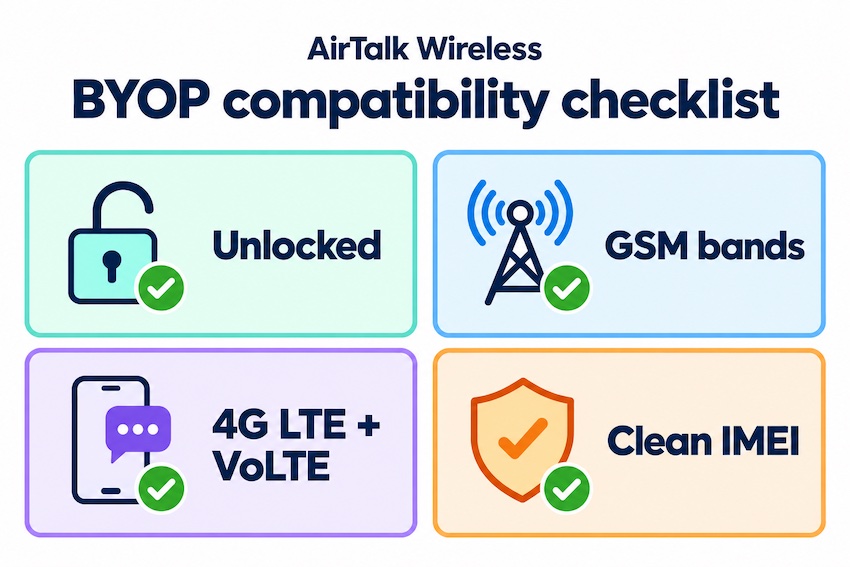
The brand matters less than these four checks.
AirTalk’s own guide sets two basic rules. The phone has to support GSM and work on AirTalk’s frequency bands, and it can’t be locked to another carrier. One detail surprises many readers: AirTalk won’t unlock a phone that another carrier has locked. You’d need to ask your original carrier to unlock it first.
Here’s what each requirement means for you:
- Unlocked: Your phone isn’t tied to one carrier. Phones you’ve fully paid off are often unlocked, but not always.
- GSM + the right bands: Your phone has to “speak the same radio language” as the towers AirTalk uses.
- 4G LTE with VoLTE: The big carriers turned off their 3G networks. Because of that, many older phones can no longer make calls or texts, or even reach 911. The same goes for some early 4G phones that lack VoLTE (also called HD Voice).
- A clean IMEI: A phone reported lost or stolen, or one with an unpaid balance at another carrier, may be blocked from activating.
AirTalk Compatible Phones: Models That Usually Work
According to AirTalk, it generally supports iPhones from the iPhone 6 onward. It also says many Samsung Galaxy A and S series phones work well on its service. The table below shows examples AirTalk names on its own compatibility page. It is not a complete list. Your IMEI check result is always the final word.
| Brand | Examples AirTalk lists as compatible | What to know |
|---|---|---|
| Apple iPhone | iPhone 6s, 6s Plus, 7, 7 Plus, 8, SE, SE (2nd gen) | Must be unlocked. Older models like the 6s and 7 no longer get the newest iOS updates, so some apps may stop working on them over time. |
| Samsung Galaxy | Galaxy S8, S8+, S9, A11, A50 | Many A-series and S-series phones work. Carrier-locked versions must be unlocked first. |
| Motorola | moto g 5G (2022), moto g stylus 5G (2022), moto edge 5G (2021), one 5G ace | Run the IMEI check, because band support varies by model and version. |
| Other brands | Not listed by AirTalk | May work if unlocked and on the right bands. Only the IMEI check can confirm it. |
Phones That Usually Won’t Work with AirTalk
- 3G-only phones. FCC lists of affected 3G devices include the Samsung Galaxy S4 and older and the iPhone 5 series and older.
- 4G phones without VoLTE. These lose calling ability on today’s networks.
- Phones locked to another carrier. They won’t work until the original carrier unlocks them.
- Phones flagged lost, stolen, or unpaid. These usually fail activation.
- Some phones bought overseas. They may be missing US bands. AirTalk also warns that devices bought in other countries might not support eSIM.
- Many basic 4G flip phones. A lot of them are carrier-locked. Run the IMEI check before you count on one.
What Network Does AirTalk Wireless Use?
AirTalk Wireless doesn’t own cell towers. Like most Lifeline carriers, it rents space on bigger networks. AirTalk says it partners with major US carriers to provide 4G and 5G service. However, it doesn’t name one single host network on its compatibility page.
Third-party guides fill in some of the gaps:
- One APN guide says AirTalk plans can run on either T-Mobile’s or AT&T’s network.
- One review reports that AirTalk moved from AT&T to T-Mobile after its parent company was bought.
Treat both as unofficial.
What this means for you: Phones built for AT&T or T-Mobile, or phones sold unlocked, are usually the best fit for AirTalk. A phone first sold by Verizon can work, but only if it’s unlocked and supports the needed bands. The IMEI check tells you either way. To compare carriers by network, see our guide to Lifeline providers that use the T-Mobile network.
How to Check If Your Phone Works with AirTalk (Step by Step)
Checking your phone takes about five minutes and costs nothing. You only need your phone and an internet connection.
- Find your IMEI number. Dial *#06# on your phone’s keypad. You can also look in your settings:
- On Android: Settings > About Phone > Status. On iPhone: Settings > General > About.
- Check if your phone is unlocked.
- On an iPhone, open Settings > General > About > Carrier Lock. If it shows “No SIM restrictions,” the phone is unlocked.
- Android menus vary by brand. The easiest test is to put in a SIM card from a different carrier. You can also call your current carrier and ask.
- Run AirTalk’s IMEI check. Enter your IMEI on AirTalk’s Bring Your Own Device page. One honest caution: AirTalk notes that passing the checker doesn’t promise every feature will work, including voice, texts, picture messages, and data.
- Check coverage where you live. Use AirTalk’s coverage map for your home address, not just your ZIP code.
- Find your EID if you want an eSIM. On Android, open Settings > About Phone > Status and scroll to the EID. A 32-digit EID means your phone has a built-in eSIM chip. On iPhone, the EID is listed under Settings > General > About.
Does AirTalk Support eSIM for BYOP?
Yes. AirTalk Wireless offers eSIM for unlocked phones that support it. An eSIM lets you start service without waiting for a physical SIM card in the mail.
The process is simple:
- When you apply, choose Bring Your Own Device and pick eSIM as your SIM type.
- Give your phone’s IMEI and EID numbers so AirTalk can confirm the hardware works with its digital activation.
- After you’re approved, AirTalk emails you a QR code.
- Scan the QR code with your phone to install the eSIM.
AirTalk says most phones made after 2020 support eSIM or dual SIM. Already an AirTalk customer? You can switch to eSIM through the SIM Replacement section of the AirTalk app or website.
How to Sign Up for AirTalk with Your Own Phone
Signing up for AirTalk BYOP works like a regular Lifeline application. The only difference is that you pick the “Bring Your Own Device” option instead of a free phone.
- Make sure you qualify for Lifeline. You can qualify through programs like SNAP, Medicaid, SSI, Federal Public Housing Assistance, or Veterans Pension. You can also qualify with an income at or below 135% of the Federal Poverty Guidelines. See our full Lifeline eligibility guide.
- Start your application with your ZIP code. AirTalk availability depends on your state.
- Choose “Bring Your Own Device.” Then pick a physical SIM or an eSIM.
- Enter your phone details and upload documents. You’ll add your IMEI (and EID for an eSIM), a photo ID, and proof of eligibility. Your eligibility is confirmed through the National Verifier, which USAC runs for the FCC.
- Wait for approval. You can check your AirTalk application status online. AirTalk says most SIM orders arrive in about 7–10 business days, though timing can vary by location.
- Activate your service. Insert the SIM or scan the eSIM QR code. Then follow our step-by-step guide to activating your AirTalk Wireless phone, SIM, or eSIM.
Once you’re active, keep using your service. Lifeline has a “use it or lose it” rule for free plans: you have to use your service at least once every 30 days. If you don’t, you’ll get a 15-day notice before it’s shut off.
Can You Keep Your Phone Number with AirTalk?
Yes. AirTalk has a Bring Your Own Number program, so you can move your current number to its service. You’ll usually need two things from your current carrier:
- Your account number
- A number-transfer PIN
Keep your old line active until the transfer is finished. If you cancel it first, you could lose the number. Our guide on keeping your number when you switch Lifeline providers walks through the details.
Already getting Lifeline from another company? Then you’re transferring your benefit, not adding a second one. Lifeline allows only one discount per household. Follow our guide on how to switch Lifeline providers so the move goes smoothly.
Phone Passed the Check but Something Isn’t Working?
Sometimes a phone passes AirTalk’s IMEI check but calls, texts, or data still don’t work. These quick fixes solve most problems:
- Restart your phone after you insert the SIM or install the eSIM.
- Make sure the SIM is seated correctly in the tray.
- Install AirTalk’s APN settings. AirTalk’s APN page has a short setup guide for restoring mobile data after a SIM swap or a device change. iPhone users can download a ready-made profile from that page.
- Update your phone’s software under Settings.
- Turn on Wi-Fi calling if your signal is weak indoors. AirTalk lists free Wi-Fi calling and 911 access as plan features.
Still stuck? AirTalk’s support line is +1 (206) 445-7825, and phone support is open Monday through Friday, 8 a.m. to 8 p.m. Central Time.
What If Your Phone Isn’t Compatible with AirTalk?
If your phone fails the check, you still have good options:
- Ask your current carrier to unlock it. Under industry rules the FCC tracks, participating carriers will unlock a postpaid phone on request once your contract or payment plan is complete and your account is in good standing.
- Get a free phone from AirTalk instead. Device options depend on your state and what’s in stock, so don’t count on a specific model. Learn more about the AirTalk Wireless free government phone.
- About iPhones: AirTalk’s iPhone promotions are mainly for Tribal customers. For example, its iPhone XR offer is limited to customers verified for Tribal Lifeline. Read the truth about free government iPhones before you apply.
- Try a provider on a different network. A phone that fails on AirTalk may pass with another carrier. You can check:
AirTalk BYOP vs. AirTalk Free Phone: Which Should You Choose?
| Bring Your Own Phone | AirTalk Free Phone | |
|---|---|---|
| What you get | Free SIM kit or eSIM | A phone from AirTalk’s current lineup, plus a SIM |
| Keep your apps and photos | Yes, nothing to move | You’ll need to transfer them |
| Phone quality | The phone you already chose | Depends on state and stock |
| How fast you can start | eSIM can activate right after approval | Wait for the phone to ship |
| Best for | People with a newer, unlocked 4G/5G phone | People with an old, locked, or 3G-only phone |
Still deciding on a carrier? Our AirTalk Wireless review covers the pros and cons. Our AirTalk vs. Assurance Wireless comparison puts two big options side by side.
Stay Safe: Bringing Your Own Phone to Lifeline Is Free
Lifeline is a free government benefit, and no real provider charges an application fee. Both of AirTalk’s options include a free SIM: AirTalk says you get a free SIM card whether you choose the free phone plan or BYOD.
The amount of free data depends on your state. For example:
- AirTalk’s Florida page lists up to 5GB of high-speed data with unlimited talk and text.
- California has larger plans, including optional paid upgrades at $10 and $20 a month.
You never need to pay for an upgrade to bring your own phone.
Only apply through verified providers or the National Verifier. If an offer feels off, use our guide to verifying a Lifeline provider and read our Lifeline scam alert.
Frequently Asked Questions
Yes. AirTalk Wireless generally supports unlocked iPhones from the iPhone 6 and newer. To be sure, go to Settings > General > About > Carrier Lock. If it says “No SIM restrictions,” your iPhone is unlocked. Then enter its IMEI on AirTalk’s BYOD page to confirm compatibility.
A phone first sold by Verizon can work with AirTalk if it’s unlocked and supports AirTalk’s GSM bands and VoLTE. Many newer Verizon phones are multi-band, but some older ones are not. AirTalk’s free IMEI check is the only reliable way to know.
Yes. AirTalk says you can move your SIM to another device as long as that phone is compatible with its service. Run the new phone’s IMEI through AirTalk’s checker first. You may also need to reinstall the APN settings.
Yes. AirTalk Wireless gives eligible Lifeline customers a free physical SIM kit or eSIM, whether they choose BYOP or a free phone. Shipping is also free. Be wary of anyone who asks you to pay for a “Lifeline SIM.”
No. Your Lifeline eligibility depends on your income or your participation in programs like SNAP, Medicaid, or SSI. It does not depend on your phone. The same rules apply either way: one benefit per household and yearly recertification.
Only if it’s unlocked, supports VoLTE, and passes AirTalk’s IMEI check. Many basic 4G flip phones are locked to the carrier that sold them. Check before you apply, and choose AirTalk’s free phone option if yours fails.